Turn a screenshot into a calendar event
The details are already on your screen. You shouldn't have to retype them.
When a screenshot is the schedule you actually have
Work invites, group-chat plans, ticket confirmations, and school portals often arrive in a form that is easier to capture than to sync. Snap to Calendar lets you choose that screenshot, review the candidate events together, and save only the ones you approve.
How to add a screenshot to your iPhone calendar
- Capture the details. Keep the event name, date, time and location in the screenshot. If the year appears elsewhere, include it in the image when possible.
- Choose the image. Open Snap to Calendar, tap Choose photo and select the screenshot. AI reads the image and proposes candidate events.
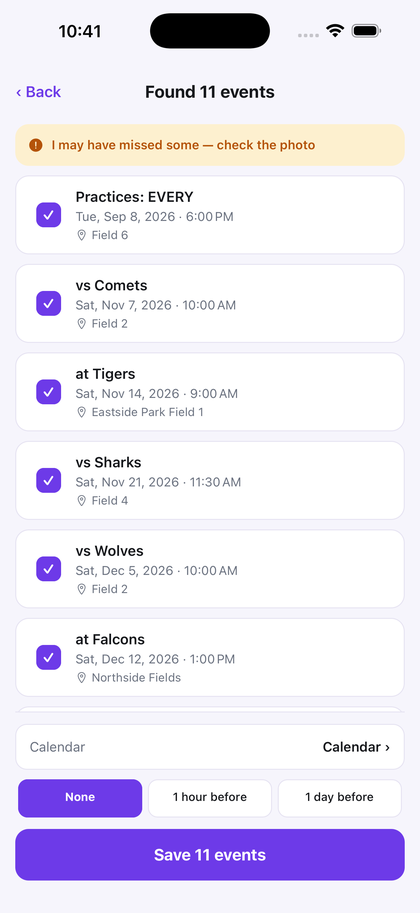
- Review before saving. Check each date and time against the source, correct anything that needs it, and uncheck events you do not want.
- Save the approved set. Choose your destination calendar and alert, then save. A screenshot containing several dated entries can become several events in one reviewed batch.
For a printed page, use the photo-to-calendar guide. For a whole term or season, see school calendars and sports schedules.
What iPhone itself can do
On supported iPhones, Apple's current Visual Intelligence documentation says it can analyze onscreen content across apps after you take a screenshot and can offer Add to Calendar when it recognizes an event. Apple has also announced saving multiple calendar events for iOS 27. Snap's difference is its dedicated review, edit, calendar/alert choice, batch save, local scan history, and exact batch undo workflow—not a claim that Apple cannot see a screenshot.
See the dated, source-linked Apple Visual Intelligence comparison.
What Snap can propose for review
- Start and end time — when it recognizes a clear 2:30–4:00 range, review the 90-minute candidate before saving.
- Location — confirm any recognized room number or street address before using it for directions.
- Notes — check recognized dial-in details, what-to-bring notes, or parking instructions.
- Repeating events — recurring language such as “every Tuesday” can produce a recurrence candidate for you to confirm.
You approve everything
Nothing saves until you've seen it. Each candidate event is listed with its date, time and location; you can fix a title, change a time, or uncheck anything you don't want. If the app isn't confident it read the whole page, it tells you on screen rather than quietly guessing. After saving there's a one-tap undo.
Common screenshots people scan
Outlook and Teams invites, Gmail and Google Calendar invites, text messages with plans, flight and hotel confirmations, ticket confirmations, school portal screenshots, and photos of printed schedules.
Screenshot it. Check the result. Save the events you approve.
Free to try — your first 3 successful scans. No deadline, no account, no sign-up.
Download on the App Store