The school calendar, without typing it out
Term dates, inset days, concerts, trips, picture day. It arrives as a flyer or a PDF screenshot and ends up on the fridge.
Why school dates get missed
They arrive in the least convenient format possible: a newsletter, a PDF attachment, a photo of a noticeboard in a class WhatsApp group. Each one holds a dozen dates spread across a term, and none of them are in a form your calendar can read.
One scan for the term
Photograph the sheet — or screenshot the PDF — and review the dated entries Snap finds together: inset days, the concert, the trip, parents' evening, picture day. You see the list, uncheck anything that isn't yours, and save the rest together.
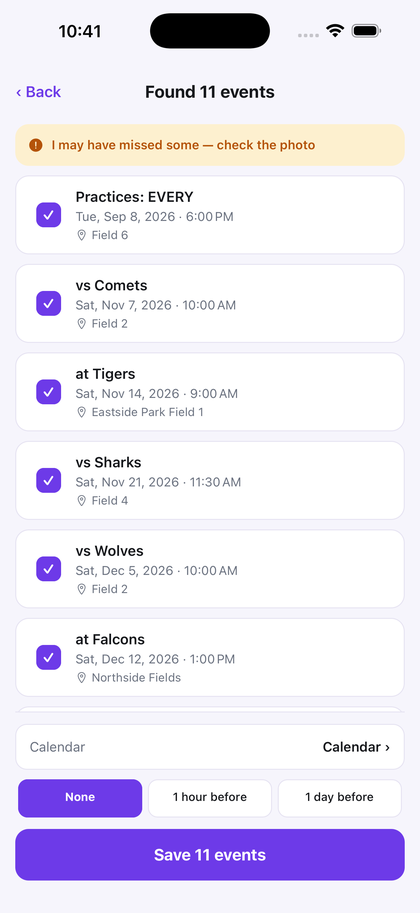
Dates printed without a time save as all-day events, which is usually what a school date is anyway.
How to add a school calendar from a photo or PDF
- Start with a readable image. Photograph the newsletter or term-date sheet. For an emailed PDF, open it on your iPhone and take a screenshot of the page; this workflow uses an image, not a direct PDF import.
- Scan the page. Choose the photo or screenshot in Snap to Calendar. AI proposes the dated entries it can read for you to review together.
- Keep only your family's dates. Check the year and each date against the newsletter. Remove entries for other classes or year groups, and check timed activities separately from all-day dates.
- Choose a calendar and save. Edit any details that need correcting, choose the destination calendar and alert, then save the approved events.
For a document with several pages, capture and review each relevant page separately. Check for overlapping dates before saving another batch so you do not add the same event twice.
If the date is inside a school portal or group message, follow the screenshot-to-calendar steps. If the school has changed a date, check the saved event against the updated notice: scanning a page is not a live subscription to the school's calendar.
Also useful for
Team schedules, club and camp timetables, and the reading-week calendar that goes home in the book bag.
Snap the newsletter. Get the term on your calendar.
Free to try — your first 3 successful scans. No deadline, no account, no sign-up.
Download on the App Store